Mortgage protection life insurance quotes: one intake instead of five carrier quote tools
Mortgage protection life insurance quotes without re-keying: enter the client once, let AI fill each carrier’s quote tool, and keep the advice for yourself.

Running mortgage protection life insurance quotes at five carriers from a single intake is doable: you enter the client once, in your agency management system or intake form, and AI carries that information into each carrier’s quote tool, then brings the rates back into your comparison. Your team reviews the flagged fields and gives the advice. Here’s how it works, with an example, and what to prepare before you start.
Quoting mortgage protection today
A new mortgage is one of the moments people think about life insurance. The NAIC’s consumer guidance lists paying off a mortgage among the needs that can drive how much coverage to buy, and suggests reviewing coverage after life changes such as a new home loan (NAIC). For many households, that means term coverage sized to the balance and matched to the length of the loan.
To advise well, you shop several carriers. Each one has its own quote tool, behind its own portal. And each one asks for the same facts, in its own way:
- date of birth, gender, state, tobacco use;
- coverage amount and term length;
- occupation and, for some carriers, travel or hazardous activities;
- riders the client wants to see.
With two spouses and five carriers, that’s ten entries of the same file. Then someone opens each result, writes down the premium, the rate class assumed, the conversion terms, and copies it all into the agency’s comparison.
It isn’t hard work. It’s slow, repetitive work where mistakes slip in quietly: a 20-year term entered as 30, the wrong tobacco answer, a coverage amount off by a zero. Meanwhile, the client is waiting for a proposal.
The fields that never match from one tool to the next
The same file doesn’t go in the same way everywhere. Here’s what you run into, on a made-up example:
| What’s in the file | Quote tool A | Quote tool B | Quote tool C |
|---|---|---|---|
| Occupation: nurse practitioner | Drop-down of 40 occupations | “Medical professional” class | Free text, then a travel question |
| Term: matches a 30-year mortgage | Term in years | Fixed menu: 10, 15, 20, 30 | “Coverage to age” |
| Coverage: loan balance | Face amount | Face amount in bands | Monthly premium budget |
| Tobacco | Yes or no | Used in the last 12 months | Vaping asked separately |
| Health class | Picked by the agent | Estimated from questions | Not asked until the application |
Three things trip people up.
The drop-downs. Occupation, mostly. Every carrier has its own list, and the same job doesn’t land in the same box everywhere. That’s often where the premium moves.
The units. Years, menus, “to age,” bands. As long as it’s done by hand, every tool needs a small conversion.
The assumptions. A quote is only as good as the rate class behind it. The NAIC’s Life Insurance Buyer’s Guide walks buyers through comparing policies on their features and costs, not just one number (NAIC Buyer’s Guide). A comparison that mixes rate classes compares nothing.
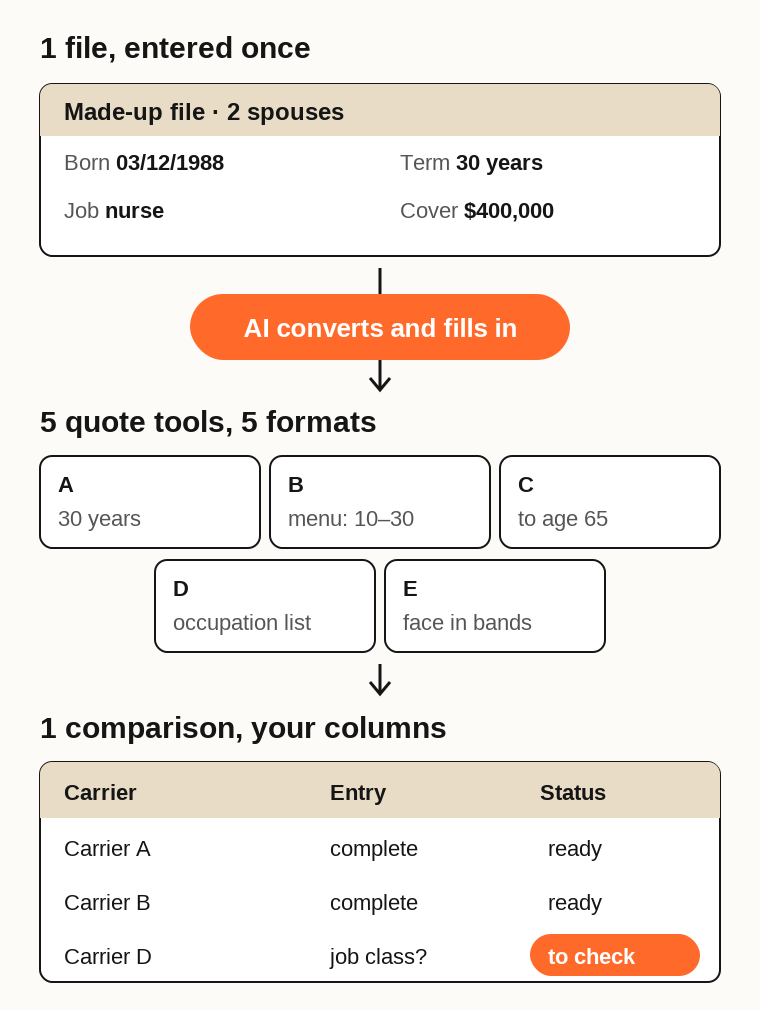
What AI takes off your plate
AI doesn’t replace the carriers’ quote tools. It uses them, the way your account manager does.
- It starts from the file. The client record in your agency management system, the intake form, the loan details the client sent. It pulls the useful facts once.
- It converts them to each carrier’s format. Term in years or “to age,” face amount or band, occupation in the right box on each list, using a mapping table built with you.
- It fills in each quote tool, in the carrier’s portal, with the agency’s login. For every field, it keeps track of where the answer came from: the intake form, the client record, the client’s email.
- It stops when it’s unsure. An occupation that could fit two classes, a rider the client asked for that one carrier doesn’t offer: the field is flagged, and your account manager decides.
- It brings the results back. Premium, rate class assumed, term, conversion option, notable exclusions, into your comparison and the client’s file.
On the made-up example above, your account manager no longer enters the same file ten times. They review one record, settle two or three flagged fields, and get a completed comparison.
What AI doesn’t do: the medical questions. Those stay between the applicant and the carrier, through the carrier’s own process.
If your agency already uses a multi-carrier quoting platform, keep it. AI covers what it doesn’t: carriers missing from the platform, moving quotes into your agency management system, getting the file ready upstream. The same idea applies to other agency tasks, covered in insurance agency automation, task by task.
What stays with the agent
A rate table isn’t advice. It sets it up.
The review. Before anything goes out, your account manager checks the flagged fields and the ones that move the premium: occupation, tobacco, term, face amount. They sign off.
The fit. The cheapest quote is useless if the term ends before the mortgage does, or if the client needs a conversion option it doesn’t have. Checking that, and explaining it, is your job.
The advice. The client’s family, income, plans and job: that’s what makes one policy the right one. And it’s what you need to be able to show, as covered in the insurance agent’s duty to advise.
The relationship. Explaining why mortgage protection is worth it, or why the client’s group life at work isn’t enough on its own. No quote tool does that for you.
Where to start
Start by measuring, then with a single carrier.
- Time one file done by hand, from the client record to the comparison sent. Without that number, you can’t tell what you’re saving.
- List the carriers you quote most often. Start with the ones that get the most files.
- Gather ten recent files, with the occupations and coverage setups you see most. They’re used to build the mapping table for occupations and riders.
- Run it side by side on a real file: AI on one side, your account manager on the other. Compare both entries, field by field.
To see how AI reads carrier documents and fills in your own spreadsheet, read group health insurance quote comparison. And if you’d like to look at your own files with us, book a free hour of advice.
FAQ
Can AI fill in a carrier’s quote tool without an API?
In most cases, yes. It fills in the carrier’s quoting screen the way your account manager would, field by field, with the agency’s own login. When a field has no clear answer in the file, it stops and flags it instead of guessing.
What happens when a carrier changes its quote tool?
It happens. The automation spots the screen that no longer matches, sets that carrier aside and alerts the agency. That case is quoted by hand at that carrier until the intake is adjusted.
What about the medical questions?
They stay between the applicant and the carrier. The AI prepares everything that isn’t medical (identity, loan, occupation, coverage amount and term) and leaves the health questions to the applicant, through the carrier’s own process.
We already use a multi-carrier quoting platform. Where does AI fit?
Keep it: it does what it was built for. AI covers the carriers the platform doesn’t, moves the quotes into your agency management system and your comparison, and gets the file ready before quoting.
What about your agency?
A free call, no commitment, to find the 2 tasks to automate first.
Book your free call