Group health insurance quote comparison: from five carrier PDFs to one spreadsheet
Five carriers, five PDFs, half a day of re-keying: how to build a group health quote comparison line by line, and what AI can take off your team’s plate.

A group health insurance quote comparison takes three things: reading every carrier’s proposal, putting every benefit on the same rows, then explaining the differences to the employer. The first two eat most of the time, and that’s where AI helps: it reads the PDFs and fills in your spreadsheet, while your team checks and advises. Here’s the method, step by step, with the traps to watch for.
Comparing group health quotes today
Employers with at least 50 full-time employees, including full-time equivalents, fall under the Affordable Care Act’s employer shared responsibility provisions (IRS). Smaller employers offer coverage to hire and keep people. Either way, every client comes back to you at renewal, and you go to market with four, five, sometimes six carriers.
The quotes come back in every format. A 12-page proposal from one carrier, a one-page rate sheet from another, a scanned exhibit from a third. Each carrier also sends a Summary of Benefits and Coverage (SBC), built to make plans easier to compare (HealthCare.gov). It helps. But it doesn’t carry the rates, and it doesn’t fill in your spreadsheet.
So someone re-keys. Row by row, benefit by benefit. At one of our clients, a group benefits broker in France, that took 40 to 60 minutes per quote. Comparing five carriers took half a day, and the firm handles about 600 quotes a year.
The hard part isn’t the typing. It’s the translating.
The five rows that trip up a comparison
Here’s what you find in real quotes, rewritten as a made-up example:
| Benefit | What carrier A says | What carrier B says | Bring it back to |
|---|---|---|---|
| Deductible | “$1,500 / $3,000” | “$2,000 per person, family max 2x” | Individual and family amounts, in-network |
| Out-of-pocket max | “$6,500 includes deductible” | “$5,000 plus Rx OOP $1,500” | One combined in-network limit |
| Office visits | “$30 copay, PCP” | “20% after deductible” | What an employee pays for a typical visit |
| Prescriptions | “Tier 2: $40” | “Preferred brand: 30%, $100 max” | One cost per tier, with the tier names matched |
| Rates | “Composite: $742 PEPM” | “Age-banded, census attached” | Monthly premium by tier (employee, +spouse, +child, family) |
Three traps come up every time.
The labels. “Preferred brand” at one carrier, “Tier 2” at another: often the same thing, sometimes not. You have to read the whole line, and sometimes the footnote.
The units. A flat copay, a coinsurance percentage after the deductible, a composite rate or an age-banded one. Until everything is in the same unit, the spreadsheet doesn’t compare anything.
What sits outside the grid. The network, the formulary and the contribution split rarely fit in a cell. Two plans with the same numbers can feel very different to employees if one network leaves out the local hospital.
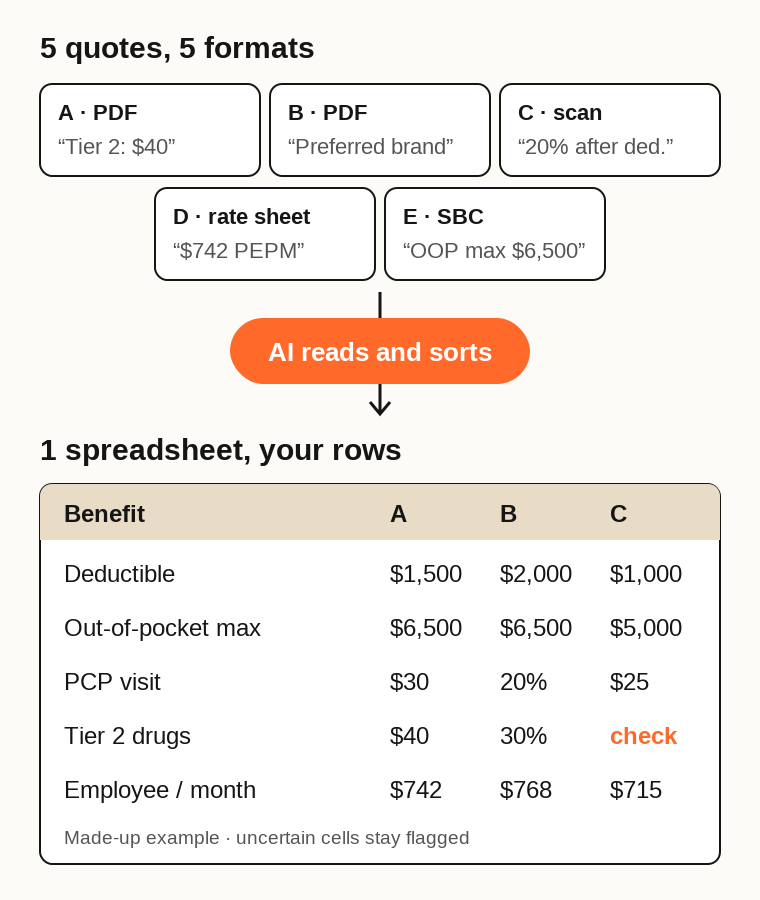
What AI takes over in the comparison
There’s no magic here. AI does what your account manager already does, faster and without getting tired.
- It reads each quote, whatever the format: native PDF, rate sheet, SBC, scanned exhibit.
- It puts each benefit on the right row of your spreadsheet. It works from a label map built with you from your past quotes: “preferred brand” goes on the “Tier 2” row.
- It converts to the same unit when it can, and flags it when it can’t.
- It highlights the differences: the best and worst offer on each row, missing benefits, riders that cost extra.
- It drafts the client summary, in your template, with the points to discuss.
What it can’t read with certainty, it doesn’t make up. The cell stays flagged, with the carrier’s wording next to it, so your account manager makes the call.
At our group benefits client, the result is easy to measure. A quote takes about 10 minutes of review instead of 50. A five-carrier comparison takes 50 minutes instead of half a day. Across 600 quotes a year, that’s about 400 hours back for the team.
The same approach works for dental, vision, life and disability quotes, and for other tasks at the agency. We break them down in insurance agency automation, task by task.
What stays with the broker
The spreadsheet isn’t the advice. It sets it up.
The review. Your account manager checks the flagged rows and the benefits that change the picture: deductible, out-of-pocket max, prescriptions. They sign off on the spreadsheet before it goes out.
The client’s rules. The employer’s contribution strategy, eligibility rules and waiting periods aren’t in the carrier quote. They’re in your client file.
The recommendation. The employer’s budget, the age and family mix of the workforce, last year’s claims, how employees feel about the current network: you weigh all of that. The AI gives you an accurate spreadsheet; you give the answer.
The relationship. Explaining to the business owner why the cheapest plan isn’t the right one, or why it is. No spreadsheet does that for you.
Where to start
Start small, and measure.
- Take your current spreadsheet. That’s what the AI will fill in. If you don’t have a stable one, that’s the first project.
- Pull ten recent quotes from four or five different carriers. They’re what the label map is built from.
- Time one comparison done by hand. Without that number, you can’t know what you’re saving.
- Test on a live request, side by side: the AI on one side, your account manager on the other. Compare the two spreadsheets, row by row.
For the bigger picture, read what AI does, and doesn’t do, for insurance agents, and how an AI audit at an insurance agency works.
FAQ
How long does a group health quote comparison take?
At one of our clients, a group benefits broker, it took 40 to 60 minutes per quote to re-key everything, so half a day for five carriers. With AI, about 10 minutes of review per quote is left.
Can AI read a scanned quote or a rate sheet saved as an image?
In most cases, yes. When a cell is unreadable or ambiguous, it flags it instead of guessing, and your account manager makes the call.
Do we have to change our comparison spreadsheet?
No. We start from the spreadsheet you already send to clients: same rows, same layout. The AI fills it in; it doesn’t redesign it.
Does the AI pick the carrier to recommend?
No. It highlights the differences. The recommendation depends on the employer’s budget, its workforce and its contribution strategy, and that’s your advice.
What about your agency?
A free call, no commitment, to find the 2 tasks to automate first.
Book your free call